
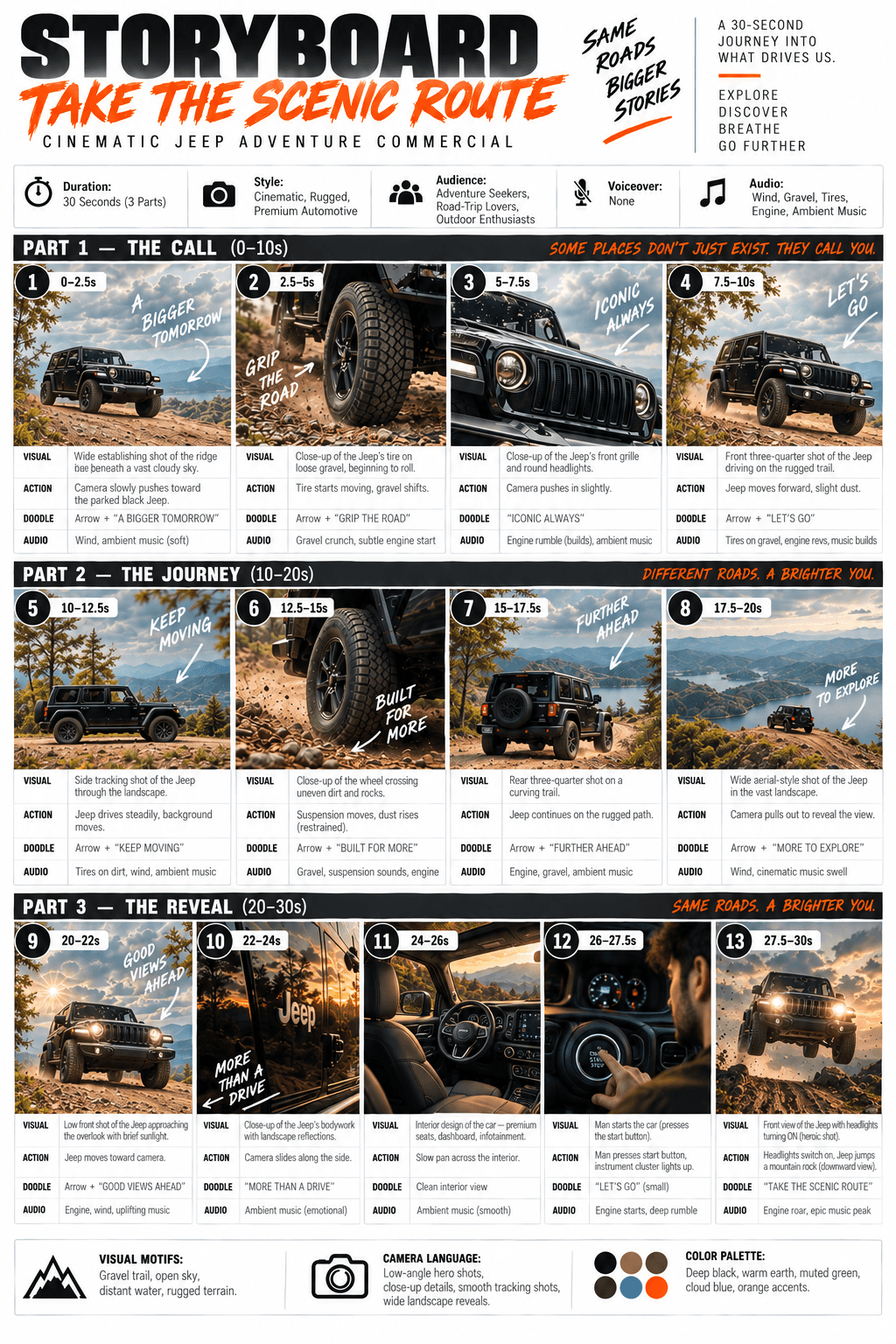

Creating an AI video can be a simple two-step process: generate a storyboard, then use that storyboard to generate the video. The storyboard plans each shot, its timing, action, on-screen text, and sound. Once it looks right, turn the panels into short video clips and join them in order.
1. Storyboard generation
Start with an idea and a reference image of your product or subject. Give the AI image tool a detailed prompt so it can lay out the full video before you make any clips. Here is a complete sample prompt for a 30-second steam iron ASMR unboxing video. Replace the product details and scene list when making a storyboard for something else.
Sample storyboard prompt
Create a clean, premium storyboard infographic for a product ASMR unboxing video.

Design specifications:

Background: White background with a modern, minimalist layout.

Title at the top: STORYBOARD

Product name in bold dark blue: HAN RIVER WET & DRY 2 IN 1 STEAM IRON

Subtitle: ASMR UNBOXING (POV HAND)

Information boxes below the title:

Duration: 30 Seconds (3 Parts)

Style: POV Hand, ASMR, Premium Product Commercial

Audience: Home Users, Housewife, Young Adults

Voiceover: No Voiceover (Pure ASMR)

Audio Suggestion: Tapping, Crinkle, Cardboard, Click, Steam, Water Pouring

Layout:

Create 12 storyboard panels arranged in a 4 column x 3 row grid, divided into three horizontal blocks labeled PART 1 (0 to 10s), PART 2 (10 to 20s), and PART 3 (20 to 30s).

Each panel should contain:

A numbered dark blue badge (1 to 12) with its respective timestamp.

A realistic cinematic image showing the scene.

Handwritten white and orange doodle text sketched over the image.

Four text sections below every image:

VISUAL:

ACTION:

DOODLE:

AUDIO:

Aesthetic Style:

Premium lifestyle commercial advertising style. Realistic product photography, light wood or beige table, soft warm studio lighting, shallow depth of field, POV hands only with no face visible. The product is a sleek, cream colored handheld steam iron with a gold rimmed ceramic base.

Storyboard sequence:

PART 1 (0 to 10s)

1 (0 to 2.5s)

Visual: Product box placed flat on a wooden table.

Action: Hands enter frame and tap the sides of the box.

Doodle: NEW!

Audio: Cardboard tapping.

2 (2.5 to 5s)

Visual: Close up of the box lid, focusing on the brand logo.

Action: Fingers gently trace the printed logo and illustration.

Doodle: LET'S OPEN!

Audio: Finger scratching on cardboard.

3 (5 to 7.5s)

Visual: A box cutter slicing the sealing tape.

Action: Blade slowly cuts through the adhesive tape.

Doodle: SLICE...

Audio: Tape cutting.

4 (7.5 to 10s)

Visual: The box flaps are opened, revealing the wrapped product and manual inside.

Action: Hands open the main flaps wide.

Doodle: WOW!

Audio: Box opening.

PART 2 (10 to 20s)

5 (10 to 12.5s)

Visual: Instruction manual being held up.

Action: Hands flip through the pages of the manual.

Doodle: MANUAL

Audio: Paper flipping.

6 (12.5 to 15s)

Visual: The iron is lifted out, still wrapped in its protective plastic sheet.

Action: Pulling the wrapped unit completely out of the box.

Doodle: CRINKLE~

Audio: Plastic crinkling.

7 (15 to 17.5s)

Visual: Peeling away the protective plastic cover to reveal the premium body.

Action: Hands slowly unwrap and twist the iron to inspect it.

Doodle: SO CLEAN!

Audio: Plastic removal.

8 (17.5 to 20s)

Visual: Ultra close up of the pristine ceramic soleplate.

Action: A single finger smoothly glides down the center of the soleplate.

Doodle: SMOOTH

Audio: Finger glide on ceramic.

PART 3 (20 to 30s)

9 (20 to 22.5s)

Visual: Rotating the ergonomic handle.

Action: Hand twists the handle 180 degrees until it locks into place.

Doodle: 180

Audio: Handle rotation click.

10 (22.5 to 25s)

Visual: Water being added to the built in tank.

Action: Pouring clean water slowly into the small inlet using a measuring cup.

Doodle: FILL

Audio: Water pouring.

11 (25 to 27.5s)

Visual: The steam button being pressed.

Action: Thumb presses the button, and a powerful burst of steam erupts from the base.

Doodle: PSSSH~

Audio: Steam release blast.

12 (27.5 to 30s)

Visual: Final hero shot of the steam iron standing upright next to its box and measuring cup.

Action: Hand enters frame to give a confident thumbs up.

Doodle: READY!

Audio: Light tap on the table.

Footer Infographic Sections:

WHAT'S IN THE BOX:

Small grid icons showing Steam Iron, Instruction Manual, Measuring Cup, and Power Cord.

KEY FEATURES:

Checkmarks for Wet & Dry 2 in 1

180 Swivel Handle

150ml Water Tank

Ceramic Soleplate

Powerful Steam

WARRANTY:

A prominent 2 YEARS WARRANTY shield badge.

IDEAL FOR / WHY CHOOSE IT:

Minimalist icons for Home Use, Travel, Small Spaces

Bullet points:

Lightweight

Easy to Use

Fast Heating

Safe

Metadata Text Line:

Total Duration: 30 Seconds

Format: Vertical (9:16)

Style: POV Hand, ASMR, Premium Product Commercial

Typography should resemble a professional creative agency storyboard layout featuring neat spacing, sharp dark blue accents, thin gray grid boundaries, and a highly polished presentation structure perfect for a client pitch.
Check the generated storyboard before moving on. Confirm that the product looks consistent, every panel has the right number and timestamp, and the 12 shots cover the full 30 seconds. If a panel or label is wrong, revise the storyboard prompt and generate it again.
Jeep adventure storyboard prompt
Here is the same storyboard format adapted for the Jeep adventure ad shown below. Attach the Jeep reference photo when you use this prompt so the vehicle stays recognizable from shot to shot.
Create a clean, premium storyboard infographic for a cinematic
Jeep adventure commercial.

Design specifications:

Background: White with a polished creative-agency layout.

Title at the top: STORYBOARD

Campaign line in bold orange: TAKE THE SCENIC ROUTE

Subtitle: CINEMATIC JEEP ADVENTURE COMMERCIAL

Information boxes below the title:

Duration: 30 Seconds (3 Parts)
Style: Cinematic, Rugged, Premium Automotive
Audience: Adventure Seekers, Road-Trip Lovers, Outdoor Enthusiasts
Voiceover: None
Audio Suggestion: Wind, Gravel, Tires, Engine, Ambient Music

Layout:

Create 13 numbered storyboard panels across three horizontal blocks:
PART 1 — THE CALL (0–10s): 4 panels
PART 2 — THE JOURNEY (10–20s): 4 panels
PART 3 — THE REVEAL (20–30s): 5 panels

Each panel must have its number and timestamp, a realistic cinematic
image, a small white or orange handwritten doodle where appropriate,
and four text rows labeled VISUAL, ACTION, DOODLE, and AUDIO.

Aesthetic style:

Use the attached Jeep photo as the visual reference. Show the same
black Jeep with consistent body shape, grille, headlights, wheels,
and trim throughout. Use a mountain road, gravel trail, pine trees,
distant water, rugged terrain, and golden-hour light. Combine wide
landscapes with close-ups of the vehicle. Make the imagery realistic
and premium, with natural dust and believable motion.

Storyboard sequence:

PART 1 — THE CALL (0–10s)

1 (0–2.5s)
Visual: Wide establishing shot of the Jeep on a ridge beneath a
dramatic sky.
Action: Camera slowly pushes toward the parked black Jeep.
Doodle: Arrow + "A BIGGER TOMORROW"
Audio: Wind and soft ambient music.

2 (2.5–5s)
Visual: Close-up of a Jeep tire on loose gravel.
Action: The tire starts rolling and gravel shifts beneath it.
Doodle: Arrow + "GRIP THE ROAD"
Audio: Gravel crunch and a subtle engine start.

3 (5–7.5s)
Visual: Close-up of the Jeep's front grille and round headlights.
Action: Camera pushes in slightly.
Doodle: Arrow + "ICONIC ALWAYS"
Audio: Engine rumble builds under ambient music.

4 (7.5–10s)
Visual: Front three-quarter shot of the Jeep on a rugged trail.
Action: The Jeep moves forward, lifting a little dust.
Doodle: Arrow + "LET'S GO"
Audio: Tires on gravel, engine revs, and music building.

PART 2 — THE JOURNEY (10–20s)

5 (10–12.5s)
Visual: Side tracking shot of the Jeep passing pine trees and
mountains.
Action: The Jeep drives steadily as the landscape moves behind it.
Doodle: Arrow + "KEEP MOVING"
Audio: Tires on dirt, wind, and ambient music.

6 (12.5–15s)
Visual: Close-up of a wheel crossing uneven dirt and rocks.
Action: The suspension moves and dust rises.
Doodle: Arrow + "BUILT FOR MORE"
Audio: Gravel, suspension movement, and engine.

7 (15–17.5s)
Visual: Rear three-quarter shot on a curving mountain trail.
Action: The Jeep continues along the rugged path.
Doodle: Arrow + "FURTHER AHEAD"
Audio: Engine, gravel, and ambient music.

8 (17.5–20s)
Visual: Wide aerial-style view of the Jeep above a vast lake and
mountain landscape.
Action: Camera pulls out to reveal the view.
Doodle: Arrow + "MORE TO EXPLORE"
Audio: Wind and a cinematic music swell.

PART 3 — THE REVEAL (20–30s)

9 (20–22s)
Visual: Low front shot of the Jeep approaching in warm sunlight.
Action: The Jeep moves toward camera.
Doodle: Arrow + "GOOD VIEWS AHEAD"
Audio: Engine, wind, and uplifting music.

10 (22–24s)
Visual: Close-up of the Jeep's side bodywork and reflected landscape.
Action: Camera slides smoothly along the side.
Doodle: Arrow + "MORE THAN A DRIVE"
Audio: Smooth, emotional ambient music.

11 (24–26s)
Visual: Premium interior view showing the seats, dashboard, and
infotainment display.
Action: Camera slowly pans across the cabin.
Doodle: No overlay; keep the interior view clean.
Audio: Soft ambient music.

12 (26–27.5s)
Visual: Close-up of a hand pressing the start button while the
instrument cluster lights up.
Action: The hand presses the button and the engine starts.
Doodle: Small "LET'S GO"
Audio: Start button click and deep engine rumble.

13 (27.5–30s)
Visual: Final front hero shot of the Jeep on the rugged trail with
headlights on and golden light behind it.
Action: The Jeep drives through dust toward the camera.
Doodle: Arrow + "TAKE THE SCENIC ROUTE"
Audio: Engine roar and epic music peak.

Footer infographic sections:

VISUAL MOTIFS: Gravel trail, open sky, distant water, rugged terrain.
CAMERA LANGUAGE: Low-angle hero shots, close-up details, smooth
tracking shots, wide landscape reveals.
COLOR PALETTE: Deep black, warm earth, muted green, cloud blue,
and vivid orange accents.

Metadata line:
Total Duration: 30 Seconds
Final Video Format: Vertical (9:16)
Style: Cinematic, Rugged, Premium Automotive

Keep the layout neat and readable, with bold black headings, orange
handwritten accents, thin gray panel borders, and polished spacing.
This is the Jeep storyboard the prompt is designed to create. It uses 13 panels instead of the steam iron example's 12, while keeping the same visual, action, doodle, and audio structure.
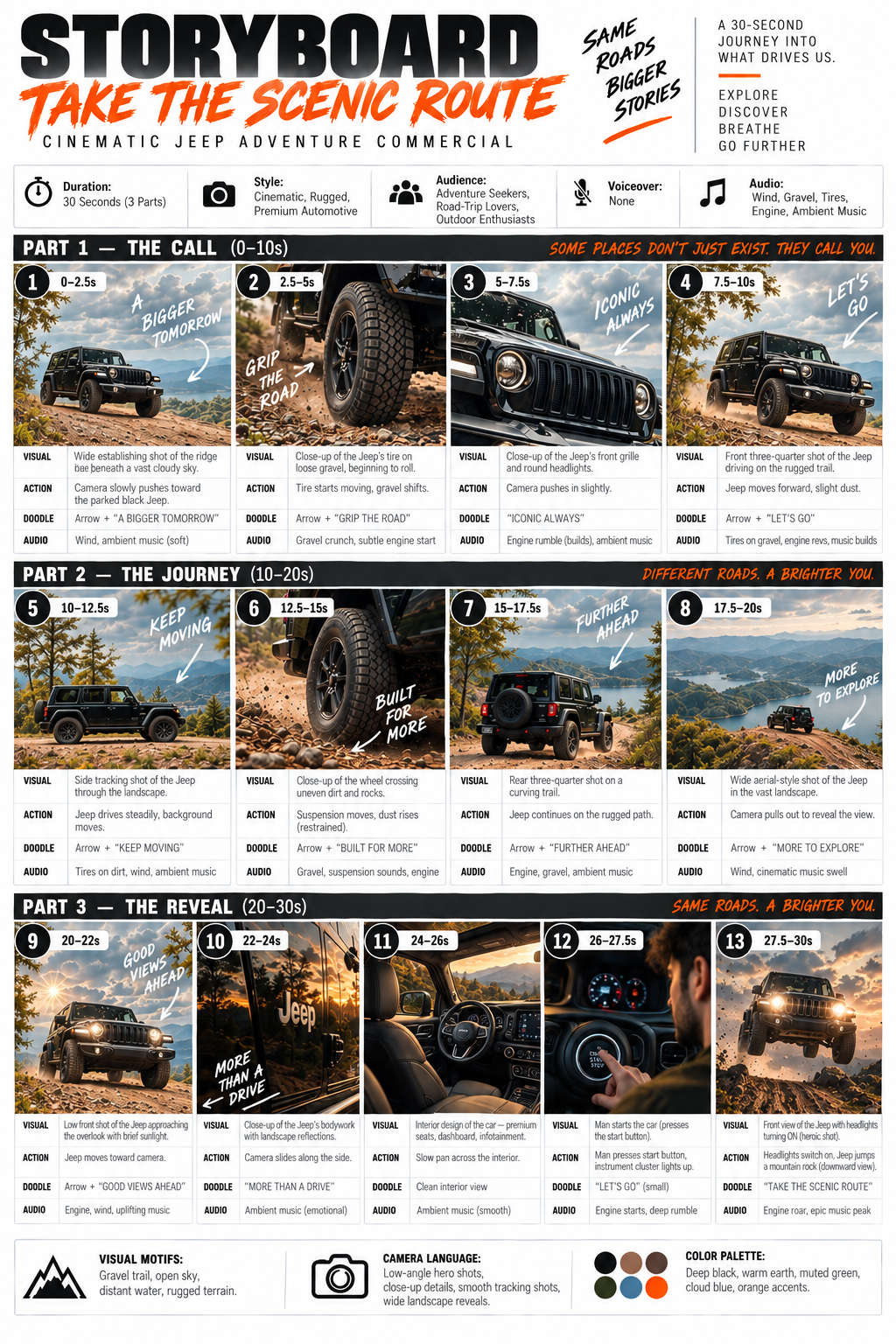
Open the storyboard at full size
2. Video generation
Once your storyboard looks right, go to Google Flow, start a project, and upload the storyboard image as a visual reference. Turn on Flow Agent and ask it to generate video that follows the numbered scenes. You can also add the original product or Jeep photo as a reference to help keep the subject consistent. Google's Flow guide explains how to add images to a prompt.
You can start with a simple request like this:
Use the uploaded storyboard as the shot plan for a 30-second vertical
9:16 video. Follow the numbered panels in order. Keep the same
product or vehicle consistent across every shot. Match each panel's
VISUAL and ACTION, use its timestamp for pacing, and use the AUDIO
notes as sound direction. Create clean cinematic footage without
the storyboard's grid, panel numbers, or text labels.
Flow works with short video clips, so generate the scenes you need and arrange them in its Scenebuilder in storyboard order. Trim the sequence to 30 seconds, then review the finished video against the panels. If a shot is missing or the subject changes appearance, ask Flow to redo that scene. Google's Scenebuilder guide covers arranging clips into a sequence.